
Introduction to WordPress SEO Optimization
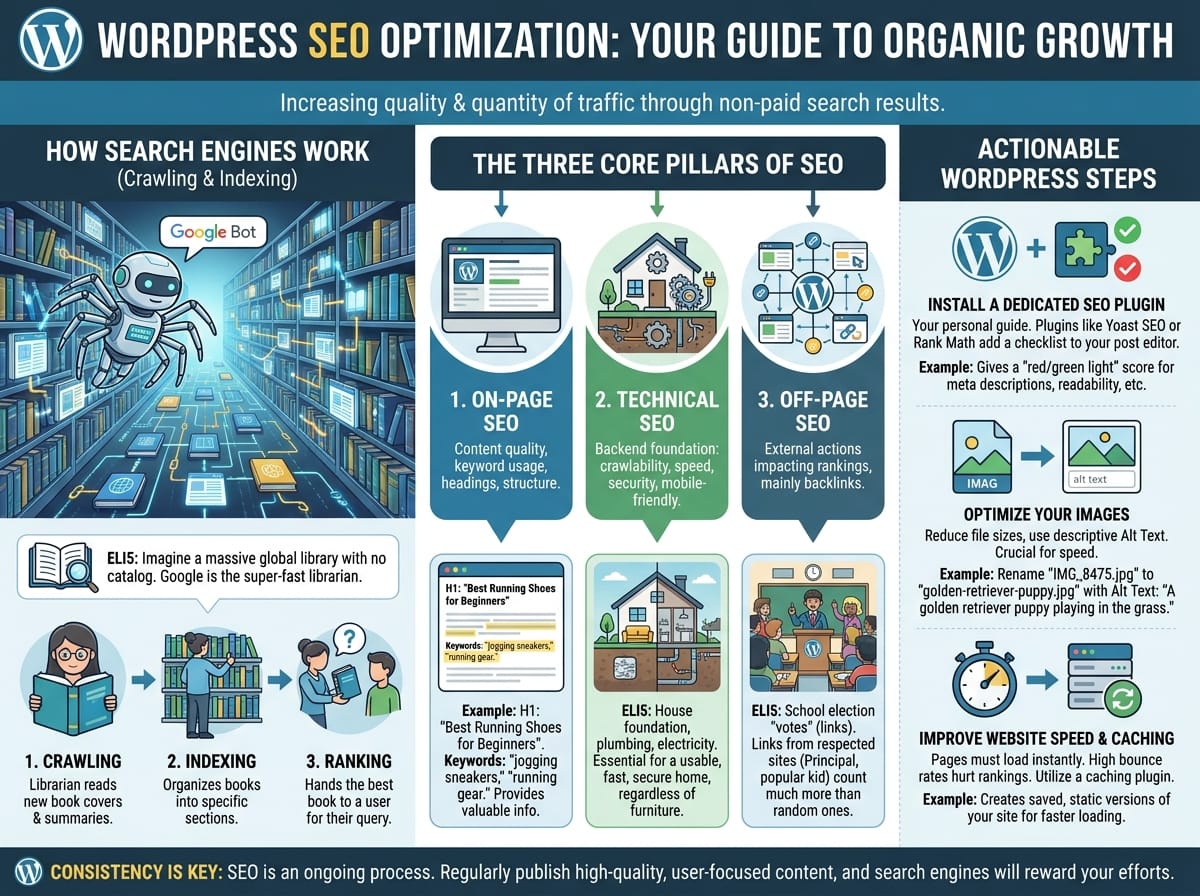
Having a beautiful WordPress website is only the first step in establishing your online presence. If you want people to actually find your website, you need to understand Search Engine Optimization (SEO). SEO is the practice of increasing both the quality and quantity of website traffic, as well as exposure to your brand, through non-paid search engine results.
In this guide, we will break down exactly how search engines work, the core pillars of website ranking, and the actionable steps you can take today to optimize your WordPress site for maximum visibility.
How Search Engines Work: Crawling and Indexing
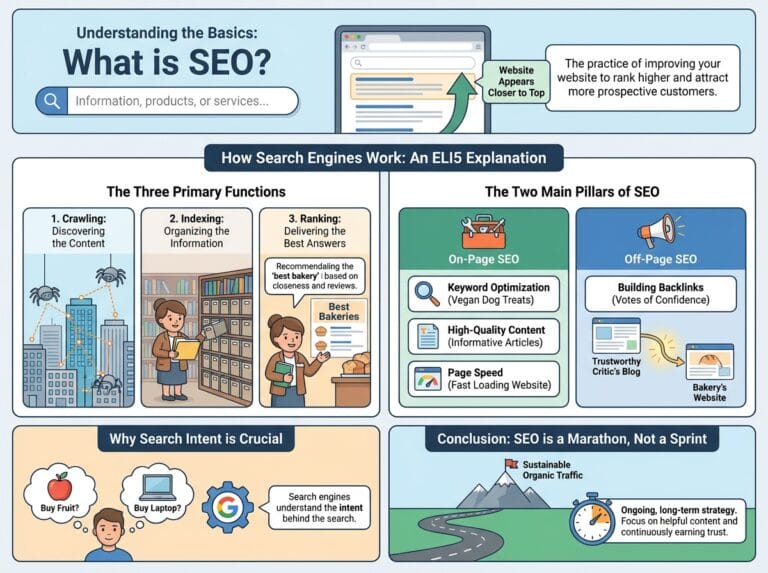
Before you can optimize your website, it is crucial to understand how search engines like Google discover and rank your content. Search engines use automated bots, often called “spiders” or “crawlers,” to navigate the web, following links from one page to another.
ELI5 (Explain Like I’m 5): Crawling and Indexing
Imagine the internet is a massive, global library with billions of books, but there is no central computer catalog. Google is the super-fast librarian.First, the librarian runs through the aisles, quickly reading the cover and summary of every new book they can find. This is called Crawling.
Next, the librarian organizes these books into specific sections so they know exactly where everything is. This is called Indexing.
Finally, when someone walks in and asks for a book on “how to bake chocolate chip cookies,” the librarian instantly hands them the best, most helpful book from the correct section. This is called Ranking.
The Three Core Pillars of SEO
To rank well on search engines, your WordPress SEO strategy must be built on three main pillars. Neglecting any of these can prevent your site from reaching the first page of search results.
1. On-Page SEO
On-page SEO refers to the content on your website and how well it answers the user’s search query. This includes your written text, keyword usage, headings, and overall content structure.
Example: If you are writing a blog post about “Best Running Shoes for Beginners,” your on-page SEO strategy would include putting that exact phrase in your main heading (H1), naturally sprinkling related keywords (like “jogging sneakers” or “running gear”) throughout the paragraphs, and ensuring the article actually provides valuable information to a beginner.
2. Technical SEO
Technical SEO involves the backend foundation of your website. It ensures that search engines can easily crawl and index your site, and that users have a smooth, fast, and secure experience.
ELI5: Technical SEO
Think of your website like a brand new house. On-page SEO is the beautiful furniture and paint inside. Technical SEO is the plumbing, electricity, and foundation. If the foundation is cracked and the lights don’t work, no one will want to stay in the house, no matter how nice the furniture is. Technical SEO makes sure your site loads fast, works on mobile phones, and doesn’t have broken links.
3. Off-Page SEO
Off-page SEO refers to actions taken outside of your own website to impact your rankings. The most important factor in off-page SEO is building backlinks, which are links from other websites pointing to yours.
ELI5: Backlinks
Imagine your website is a candidate in a school election. Every time another website links to yours, it counts as a “vote.” However, not all votes are equal. If a random student votes for you, that’s good. But if the school principal and the most popular kid in school vote for you, you look incredibly trustworthy. Google views links from highly respected, established websites as strong votes of confidence.
Actionable Steps to Optimize Your WordPress Site
Now that you understand the theory, here are practical steps you can implement on your WordPress site to start climbing the search engine ranks.
Install a Dedicated SEO Plugin
WordPress is incredibly SEO-friendly out of the box, but an SEO plugin acts as your personal guide to make sure you don’t miss any critical steps. Plugins like Yoast SEO or Rank Math add a checklist to the bottom of your post editor.
Example: When you draft a new post, an SEO plugin will give you a “red light” or “green light” score. It will remind you if you forgot to add a meta description, or if your paragraphs are too long and hard to read.
Optimize Your Images
Large, uncompressed images are the number one cause of slow-loading websites. Since search engines penalize slow websites, image optimization is a mandatory technical SEO practice.
- Compress before uploading: Use tools to reduce file sizes without losing quality.
- Use Descriptive Alt Text: Search engines cannot “see” images. They read the “alt text” (alternative text) to understand the picture.
Example: Instead of uploading an image named IMG_8475.jpg with no alt text, rename the file to golden-retriever-puppy.jpg and set the alt text to “A golden retriever puppy playing in the grass.” This helps search engines understand the image and can even help you rank in Google Image Search.
Improve Website Speed and Caching
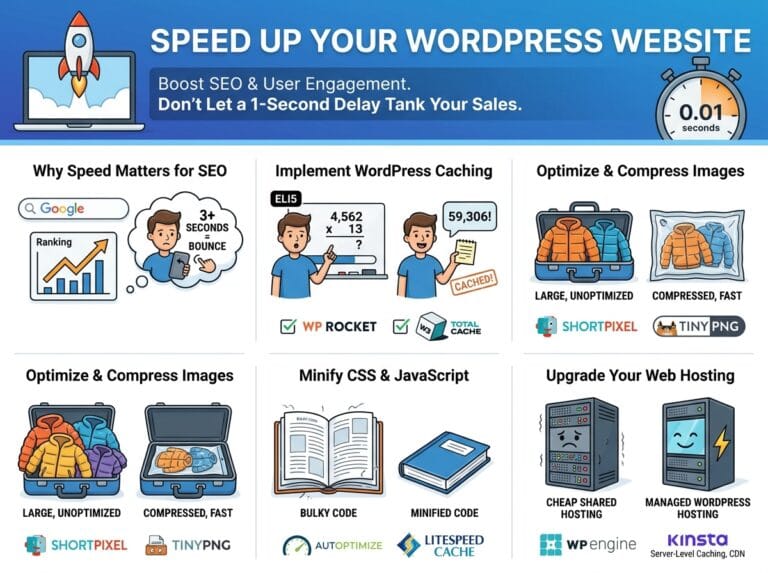
When a user clicks your link in the search results, they expect the page to load almost instantly. If it takes longer than three seconds, most users will hit the “back” button. This is called a “bounce,” and high bounce rates tell Google your site is unhelpful.
To fix this, utilize a caching plugin on your WordPress site. Caching creates a saved, static version of your site so the server doesn’t have to rebuild it from scratch every time a new visitor arrives.
Consistency is Key
Search engine optimization is not a one-time task; it is an ongoing process. By understanding how search engines crawl and index your site, balancing your technical, on-page, and off-page strategies, and utilizing WordPress-specific tools, you will steadily increase your organic traffic. Keep publishing high-quality, user-focused content, and the search engines will eventually reward your efforts.