
The Ultimate Guide to Mastering WordPress SEO
You have just spent hours designing the perfect WordPress website, writing incredible content, and hitting the “Publish” button. But days go by, and your traffic is at zero. Why? Because without Search Engine Optimization (SEO), search engines like Google simply do not know your website exists. In this comprehensive guide, we will break down exactly how to structure and optimize your WordPress site to rank higher on search engines and drive organic traffic.
Understanding the Basics of SEO
Before diving into the technical aspects of WordPress, it is crucial to understand how search engines view your website.
What is Search Engine Optimization?
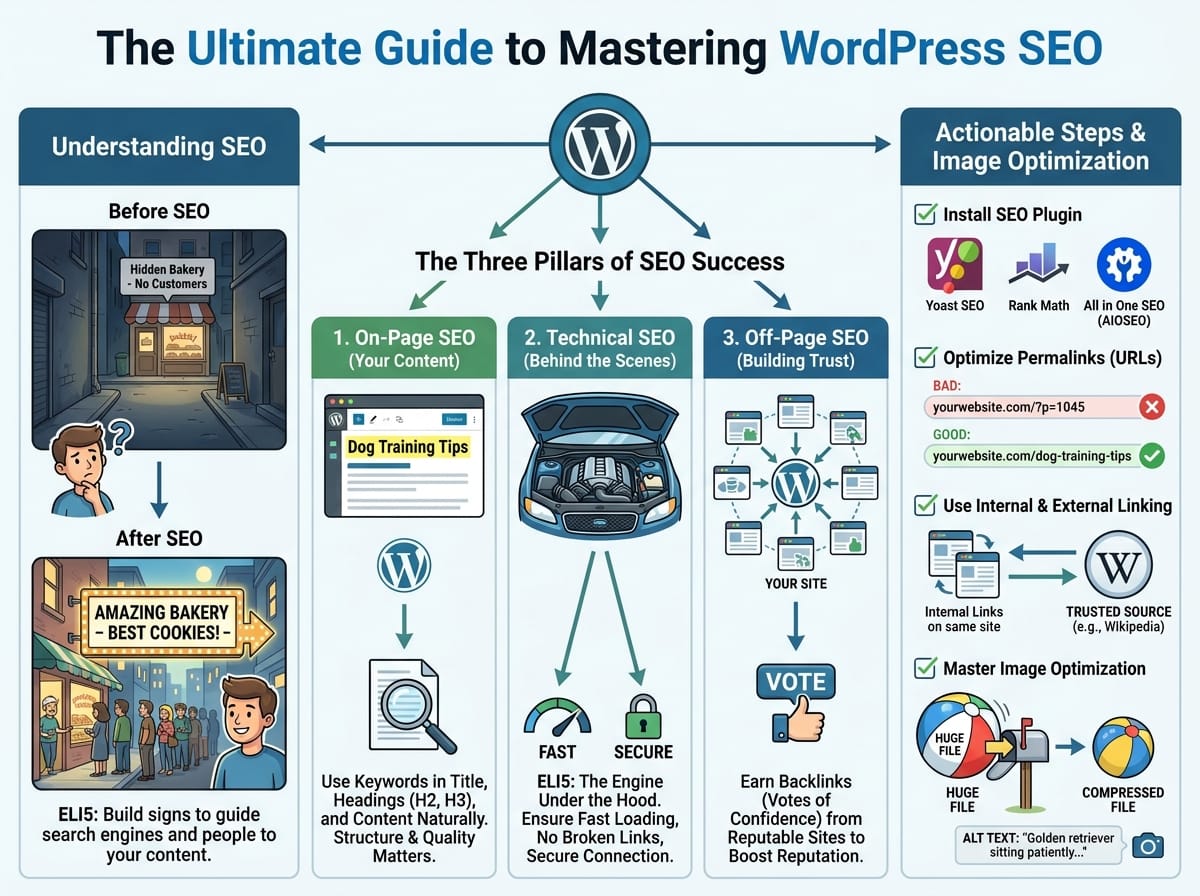
ELI5 (Explain Like I’m 5): Imagine you open the most amazing bakery in the world. It has the best cookies and cakes. However, your bakery is hidden at the end of a dark, empty alleyway with no signs pointing to it. No matter how good your cookies are, you won’t get any customers because nobody knows you are there. SEO is the process of building massive, brightly lit signs on the busiest street in town, pointing hundreds of hungry people directly to your front door.
In the digital world, Google is the town, and SEO is the signs. By optimizing your site, you are telling Google exactly what you sell or write about, so it can send the right people to your website.
The Three Pillars of SEO Success
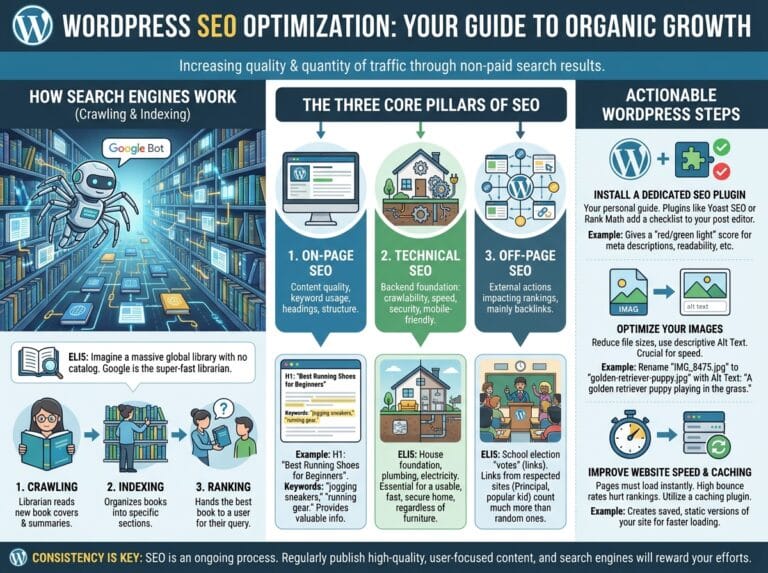
To rank on search engines, your WordPress SEO strategy must be built on three core pillars. Missing even one of these can drastically hurt your chances of reaching the first page.
1. On-Page SEO (Your Content)
On-page SEO refers to everything you do on your website to help search engines understand your content. This involves using the right keywords, writing high-quality articles, and structuring your headings (like the H2s and H3s in this post!).
Example: If you are writing a post about “Dog Training Tips,” you should ensure that the exact phrase “dog training tips” appears naturally in your main title, your first paragraph, and within your subheadings.
2. Technical SEO (Behind the Scenes)
Technical SEO ensures that search engines can easily crawl, read, and index your website without running into errors.
ELI5: Think of a car. On-page SEO is the shiny red paint job and the comfortable leather seats. Technical SEO is the engine hidden under the hood. If the engine is broken, it doesn’t matter how beautiful the paint job is—the car isn’t going anywhere. For a website, a broken engine means slow loading speeds, broken links, or an unsecure connection.
3. Off-Page SEO (Building Trust)
Off-page SEO is all about your website’s reputation across the internet. The most common form of off-page SEO is earning backlinks—which are links from other reputable websites pointing back to yours. Google views these links as “votes of confidence.” The more high-quality votes you have, the higher you rank.
Actionable Steps to Optimize Your WordPress Post
Now that we understand the theory, let’s look at practical steps you can take inside your WordPress dashboard right now.
Install a Dedicated SEO Plugin
WordPress is incredibly SEO-friendly out of the box, but you need a dedicated plugin to fine-tune your settings. Popular options include:
- Yoast SEO: The most popular beginner-friendly plugin.
- Rank Math: A lightweight plugin with advanced features for free.
- All in One SEO (AIOSEO): Great for e-commerce and local businesses.
Optimize Your Permalinks (URLs)
A permalink is the permanent web address of your specific blog post. Search engines read URLs to figure out what a page is about.
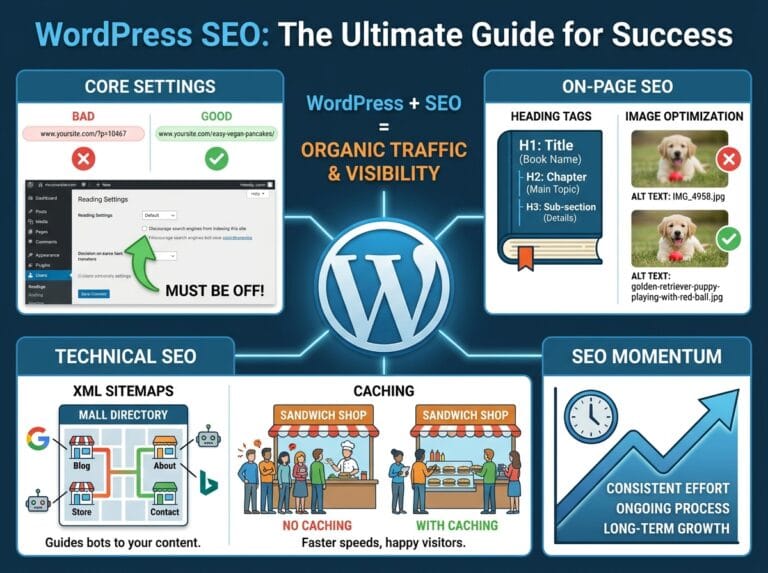
Example of a Bad URL: www.yourwebsite.com/?p=1045 (This tells Google absolutely nothing about the page).
Example of a Good URL: www.yourwebsite.com/dog-training-tips (This tells Google and the user exactly what to expect).
Use Internal and External Linking
Linking is the connective tissue of the internet. Whenever you write a new post, you should include two types of links:
- Internal Links: Links that point to other articles on your own website. This keeps visitors on your site longer and helps Google discover your other content.
- External Links: Links pointing to authoritative sources (like Wikipedia or an industry study). This shows Google that your article is well-researched and trustworthy.
Mastering Image Optimization
Many beginners upload massive image files to their WordPress sites without realizing they are destroying their SEO. Large images slow down your page loading speed, which is a major ranking factor for Google.
Compress Your Images and Use Alt Text
ELI5: Imagine trying to mail a giant, fully inflated beach ball through the post office. It takes up too much space and costs a fortune. If you deflate it first, it ships instantly. Compressing your images is like deflating the beach ball—it makes the file size tiny without changing how the picture looks once it’s on the screen.
Additionally, always use Alt Text (Alternative Text). Search engines cannot “see” images. Alt text is a brief description of the image that tells Google what the picture represents. For example, instead of leaving the alt text blank, write: “A golden retriever sitting patiently during a dog training session.”