
Why SEO Matters for Your WordPress Website
If you have recently launched a website, you have likely heard the acronym SEO (Search Engine Optimization) thrown around. But what exactly is it, and why does it matter so much? In short, SEO is the process of improving your website so that it appears closer to the top of search engine results pages, like Google or Bing. When your WordPress site is optimized, you get more organic (free) traffic, build trust with your audience, and ultimately generate more sales or readers.
The ELI5 Explanation: How Search Engines Work
Search engines can seem like complex magic, but the core concept is actually quite simple. Let’s break it down into an Explain Like I’m 5 (ELI5) analogy.
The Infinite Library Analogy
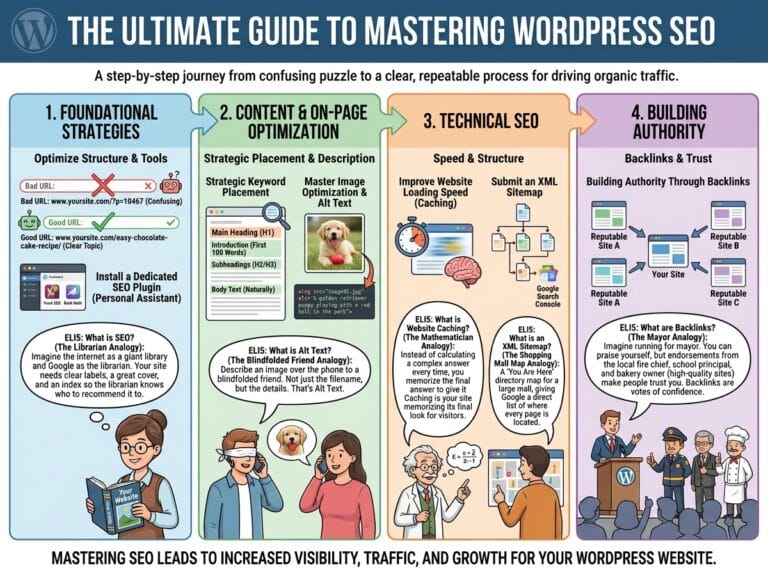
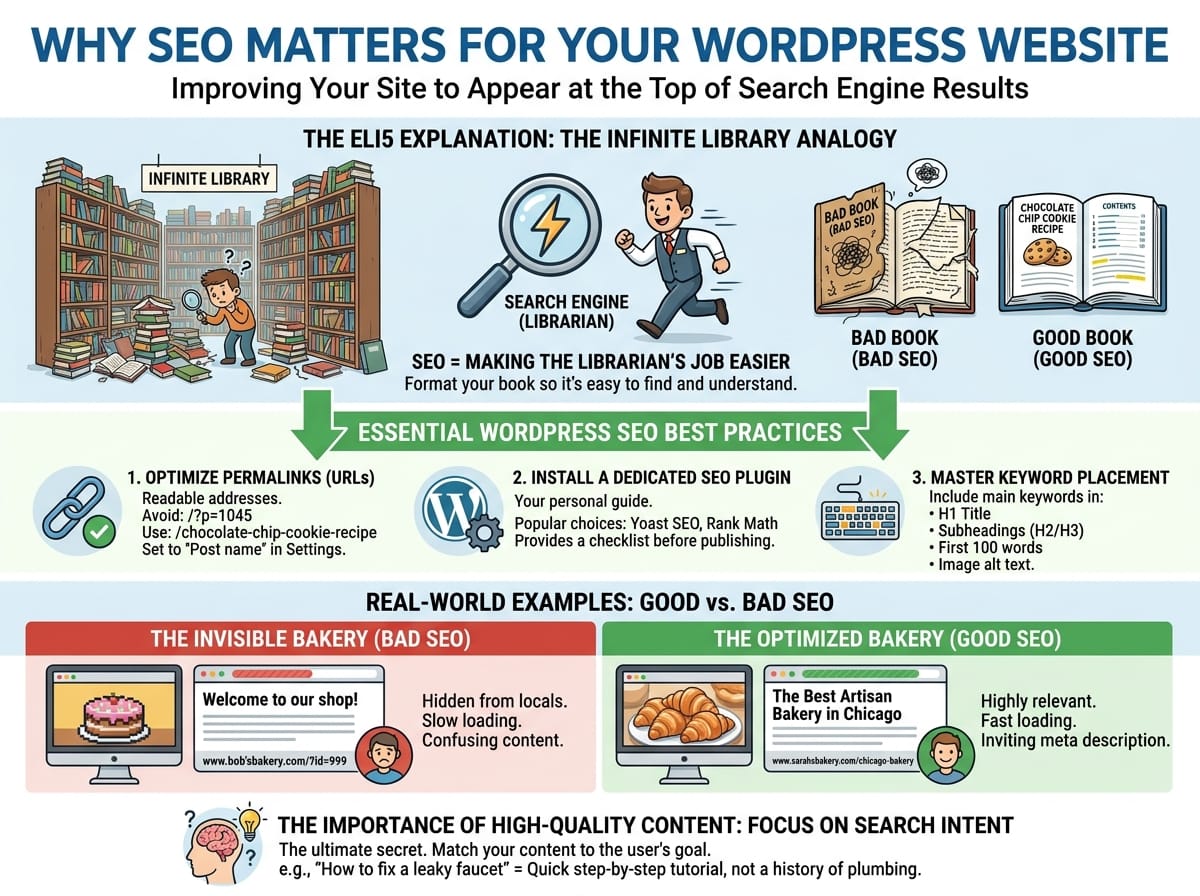
Imagine the internet is a massive, infinite library containing billions of books (which represent websites). However, this library has no central catalog system, and new books are being tossed onto the shelves every single second.
A search engine, like Google, is a super-smart, lightning-fast librarian. When you walk in and ask for a “chocolate chip cookie recipe,” the librarian instantly speeds through the entire library, scans the pages of every single book, and hands you a stack of the absolute best, most relevant books.
SEO is simply the act of making the librarian’s job easier. It is how you format your book so the librarian knows exactly what it is about. If your book has a clear title, an easy-to-read table of contents, and high-quality information, the librarian is going to recommend your book first. If your book has a messy cover, missing pages, and confusing text, it will be left at the bottom of the pile.
Essential WordPress SEO Best Practices
Now that you understand the concept, how do you actually apply this to your WordPress website? Here are the fundamental steps to ensure the “librarian” loves your site.
1. Optimize Your Permalinks (URLs)
Your permalink is the permanent web address of your specific page or post. Search engines read these URLs to figure out what the page is about.
- Bad Example: www.yourwebsite.com/?p=1045
- Good Example: www.yourwebsite.com/chocolate-chip-cookie-recipe
In your WordPress dashboard, you can change this by navigating to Settings > Permalinks and selecting the “Post name” option. This ensures your URLs are readable by both humans and search engine bots.
2. Install a Dedicated SEO Plugin
WordPress is inherently friendly to search engines out of the box, but an SEO plugin acts as your personal guide. These plugins give you a checklist of things to fix before you hit “publish.”
Popular examples include:
- Yoast SEO: Great for beginners and provides a traffic-light system (Red, Orange, Green) to grade your content.
- Rank Math: A modern, lightweight alternative that offers advanced features for free.
3. Master Keyword Placement
Keywords are the exact words or phrases people type into the search bar. If you want to rank for a specific topic, you need to include those words naturally within your content.
Always try to include your main keyword in:
- The main title of your post (H1)
- At least one subheading (H2 or H3)
- The first 100 words of your article
- The image file names and “alt text” (e.g., instead of IMG_992.jpg, name it chocolate-chip-cookie.jpg)
Real-World Examples of Good vs. Bad SEO
To truly understand the impact of these optimizations, let us look at two hypothetical businesses trying to attract local customers.
Example 1: The Invisible Bakery (Bad SEO)
Bob owns a bakery in Chicago. His website homepage simply says “Welcome to our shop!” The images on his site are huge, causing the page to take 15 seconds to load. His URLs look like random numbers, and nowhere on his homepage does he actually use the words “Chicago bakery” or “fresh pastries.” When locals search for a bakery nearby, Google’s librarian skips Bob’s site entirely because it has no idea where he is located or what he sells.
Example 2: The Optimized Bakery (Good SEO)
Sarah also owns a bakery in Chicago. Her homepage headline says, “The Best Artisan Bakery in Chicago.” Her images are compressed so the site loads in under 2 seconds. She uses a WordPress SEO plugin to ensure her meta descriptions (the short summary you see on Google) invite people to click. When locals search for a “bakery in Chicago,” Google instantly recognizes Sarah’s site as highly relevant and places her at the very top of page one.
The Importance of High-Quality Content
While technical tricks and plugins are incredibly helpful, search engines are ultimately trying to serve the human reader. The absolute best SEO strategy is to write engaging, deeply informative content that answers the searcher’s question better than anyone else on the internet.
Focus on Search Intent
Search intent is the why behind a search. If someone types “how to fix a leaky faucet,” they do not want to read a 2,000-word history of plumbing. They want a quick, step-by-step tutorial. Matching your WordPress content to exactly what the user expects to see is the ultimate secret to ranking highly on search engines in 2024 and beyond.