
The Pitch: Frontier AI for the Price of Tokens
Most people assume that running a private, self-hosted AI assistant requires one of two frustrating compromises: either dropping $2,000 on a high-end GPU to stuff in a closet, or settling for weak, forgetful local models on a laptop. If you want top-tier intelligence, the default answer has always been to pay $20 per seat, per month, for a commercial subscription like ChatGPT Plus or Claude Pro.
There is a third path that almost nobody talks about. You can build a private, family-ready ChatGPT alternative hosted on your own domain, powered by genuinely frontier AI models, for roughly $15 to $30 a month in API usage. No hardware investments, no per-user subscription fees, and complete control over your data.
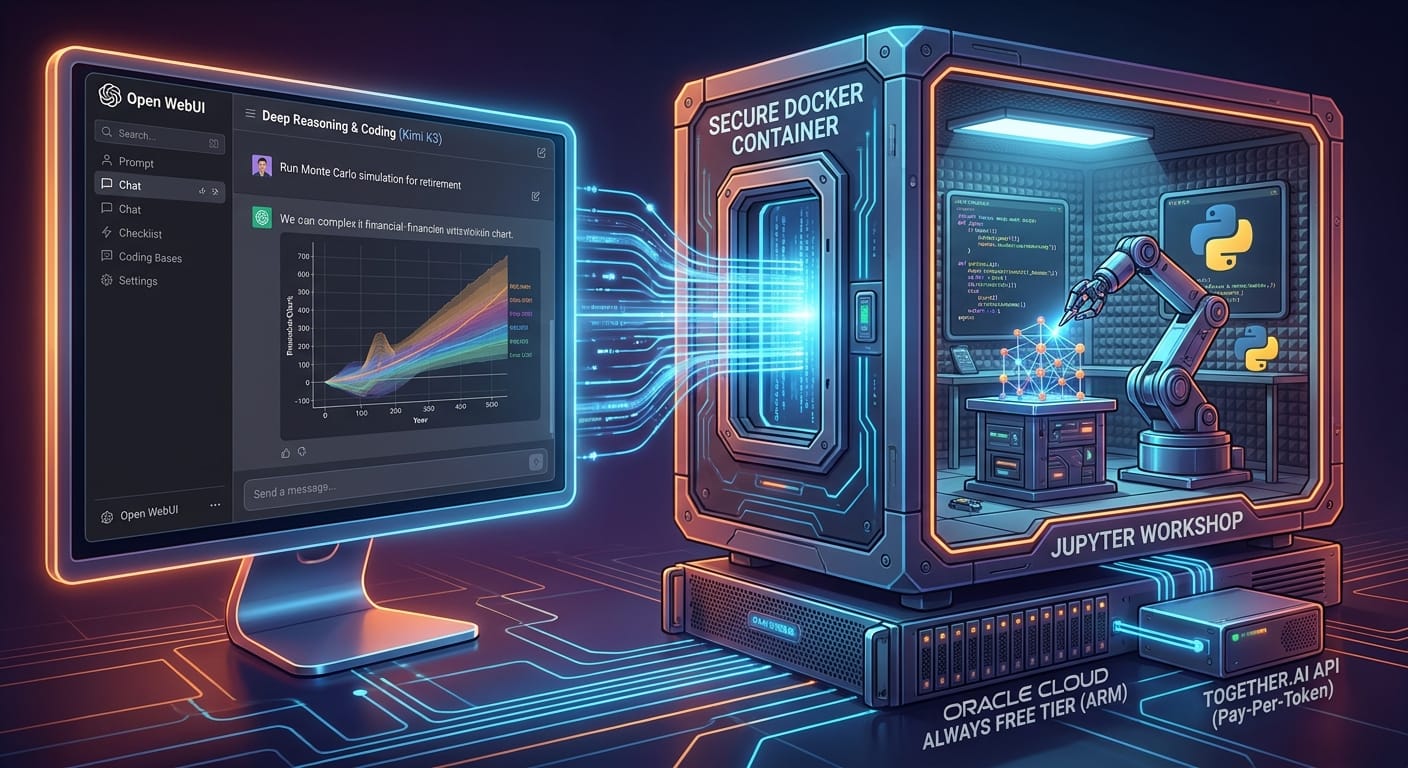
The secret relies on an incredible, underutilized resource: Oracle Cloud’s Always Free tier. Oracle provides a surprisingly capable ARM server featuring 4 OCPUs and 24GB of RAM at no cost, forever. This is more than enough horsepower to run a polished web interface. Instead of running the AI model on this server, we outsource the heavy lifting to Together.ai. Their API serves trillion-parameter-class models, like Kimi K3, which easily rival the big commercial chatbots. You are billed purely per token—meaning you only pay for the exact words you generate.
By gluing these services together with Open WebUI (a beautiful, highly customizable self-hosted chat interface), you get an enterprise-grade AI workbench. The whole build is a weekend project for anyone comfortable copy-pasting terminal commands. Here is the exact path to building it, including the potholes you need to avoid.
The Tech Stack: Server, Docker, and the Undocumented Gotchas
Building this stack requires four main components: your cloud server, your container manager, your web server for secure access, and your AI brain. Getting them to play nicely together requires navigating a few roadblocks that official documentation often skips.
Securing Your Oracle Cloud Instance (And Beating the Capacity Error)
The first step is setting up an Ubuntu instance on Oracle Cloud’s Always Free tier. However, new users almost immediately hit the infamous “out of capacity” error when trying to provision their ARM server.
The Fix: First, try switching your Availability Domains within your region. If that fails, the ultimate workaround is to upgrade your account to “Pay-As-You-Go.” As long as you keep your server within the 4 OCPU and 24GB RAM limits, your instance remains completely free. As a bonus, upgrading to a paid account prevents Oracle from automatically reclaiming your server during periods of low activity.
Deploying Open WebUI with Docker and Caddy
Once your server is running, you will use Docker Compose to spin up Open WebUI. To make your AI accessible from anywhere securely, you should place it behind Caddy. Caddy is a lightweight web server that automatically provisions and renews SSL certificates (HTTPS) for your custom subdomain (e.g., ai.yourdomain.com). This ensures that all conversations between your phone or laptop and your server are completely encrypted.
Curating the Model Menu for Non-Technical Users
After connecting Open WebUI to your Together.ai account by pasting in an OpenAI-compatible API key, you will be faced with a massive list of over 200 AI models. Handing this to a spouse or teenager is a recipe for confusion.
The Pro Move: Disable all the models in the admin settings and curate a menu of just three to five highly capable models. Rename them from their cryptic technical strings to purpose-labeled names. For example:
- Rename “meta-llama/Llama-3-70b-chat-hf” to “Best All-Around (Llama 3)”
- Rename “Kimi-K3-Instruct” to “Deep Reasoning & Coding”
- Rename “Mixtral-8x7B” to “Fast & Cheap (Simple Questions)”
This allows your family members to pick an AI based on the task they need to accomplish, rather than guessing which parameter count is appropriate.
Essential Cost-Control and Capability Upgrades
When you pay per token, efficiency is everything. A poorly configured self-hosted AI can quietly drain your account balance if you aren’t paying attention to how tokens are being used in the background.
The Background Task Model Trap
Here is the most important cost-control setting that matters more than everything else combined: set a cheap, fast model as your background “Task Model.”
Every time you start a new chat, Open WebUI asks the AI to read your first prompt and generate a short, relevant title for the chat history sidebar. It also automatically generates tags for searchability. If you don’t change the default settings, it will use your flagship, trillion-parameter model to write these three-word titles, billing you at flagship prices for background admin tasks. By switching the task model to a fraction-of-a-cent model, you cut your API costs by up to 30%.
Adding Real-Time Web Search with Tavily
Out of the box, your AI only knows information up to its training cutoff date. To give it the ability to research current events, integrate the Tavily Search API. Tavily offers a generous free tier designed specifically for AI agents. Once you enable full-page retrieval in Open WebUI, your self-hosted assistant will be able to crawl live websites and provide highly accurate answers with source citations, rivaling the web-search capabilities of Google Gemini.
The Payoff: Code Execution Turns a Chatbot into a Workbench
Answering questions is great, but doing work is where self-hosted AI truly replaces commercial subscriptions. By adding one more Docker container to your setup—the Jupyter SciPy notebook image—you upgrade your assistant from a text generator to a data analyst.
ELI5: How Secure Code Execution Works
Think of your AI assistant like a brilliant architect who can design a skyscraper, but doesn’t actually own a hammer or a hardhat to build it. By adding a Jupyter notebook to our setup, we are building a locked, soundproof workshop for the AI. This workshop (the internal Docker network) has all the heavy machinery and tools (Python programming) it needs, but it has no doors leading out to the public internet. The AI can write instructions, slide them under the door into the workshop, let the tools build a complex financial chart or run a simulation, and then slide the finished picture back under the door to you. Your AI gets to do real work, but hackers on the internet can’t ever access the workshop.
Real-World Examples of AI Code Execution
Because the Jupyter container is only reachable on Docker’s internal network, it is incredibly secure. When you ask the AI a complex question, it writes Python code, executes it in the Jupyter container, and displays the actual rendered results in your chat window.
- Retirement Portfolio Simulations: In my first test, I asked the AI for a retirement portfolio simulation comparing three different stock and bond allocations over a 30-year period. Instead of hallucinating numbers, it wrote a Python script, ran a Monte Carlo simulation, and produced publication-quality histograms and percentile fan charts in about 60 seconds.
- Live Financial Data Analysis: In a second test, I asked it to evaluate a specific public company. The AI used the
yfinancePython library to pull five years of real, live financial data. It then charted revenue, free cash flow, earnings per share (EPS), and share count. The numbers matched the SEC filings flawlessly because the AI wasn’t guessing—it was fetching and plotting real data.
The Final Scorecard: Self-Hosted vs. Commercial AI
After running this stack, it becomes clear that self-hosted AI is no longer just a hobbyist experiment; it is a viable daily driver. Here is the honest scorecard of where this setup wins, and where commercial subscriptions still hold an edge.
Where the Self-Hosted Stack Wins
- Cost Transparency & Scaling: For a family of four, four ChatGPT Plus accounts cost $80 a month. This setup costs $15 to $30 total, based entirely on how much you actually use it.
- No Usage Caps: Commercial services throttle you after 40 or 50 messages. With your own API connection, you are never locked out of your AI when you need it most.
- Customization: You have absolute control over system prompts, default behaviors, and the specific models you want to use for specific tasks.
Where Commercial Subscriptions Still Win
- Vision Capabilities: While open-weight models are getting better at reading images, proprietary models like GPT-4o are still noticeably better at understanding complex screenshots, messy handwriting, and UI layouts.
- The Hardest Reasoning Tasks: For absolute bleeding-edge logic puzzles and advanced software architecture generation, the top-tier closed models still hold a slight advantage over open-weight alternatives.
For many power users, the ultimate answer isn’t choosing one or the other. It is adopting a hybrid approach. By routing 95% of your daily research, writing, coding, and data analysis through your $15/month self-hosted Open WebUI stack, you can share a single commercial subscription for those rare moments when you need top-tier image recognition. It is a smarter, more private way to integrate frontier AI into your life without paying an enterprise premium.