

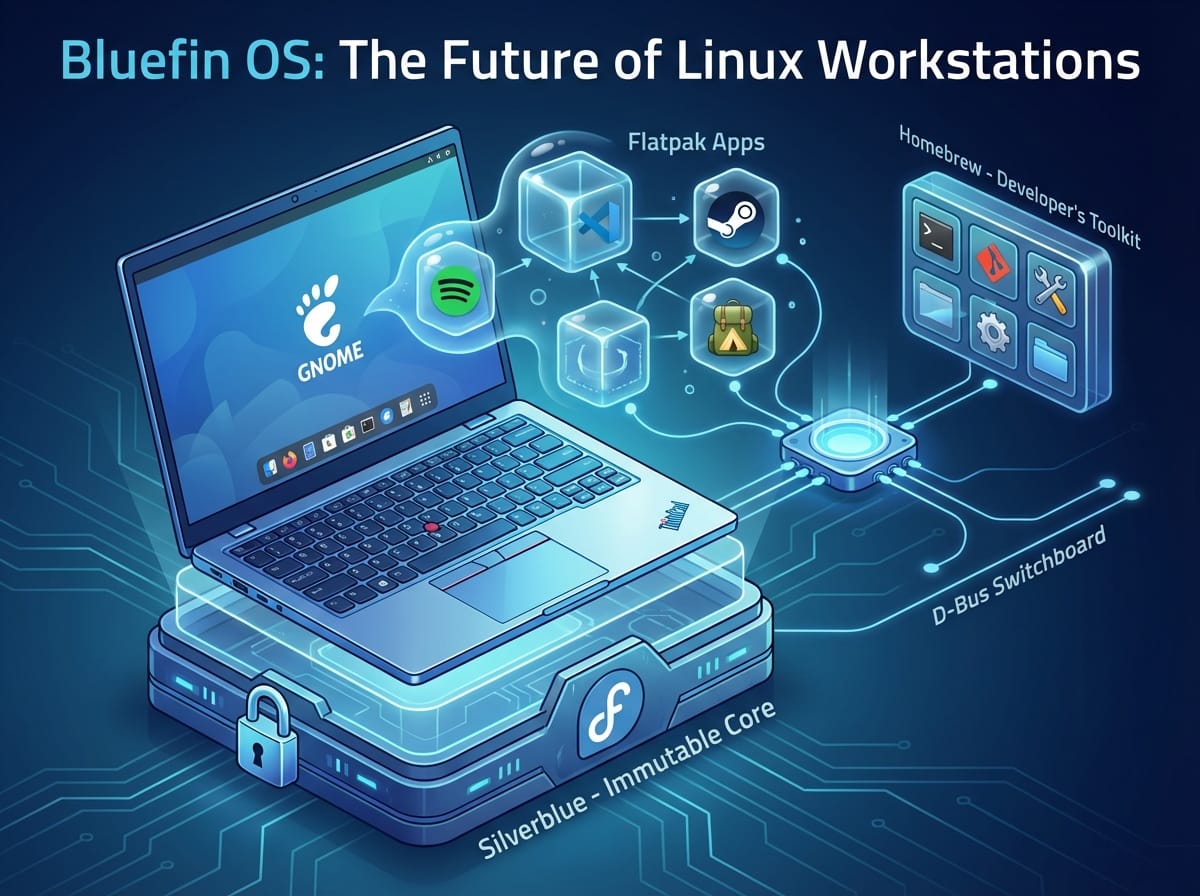
Welcome to the Future of Linux Workstations: A Deep Dive into Bluefin OS
As we power through 2026, the landscape of Linux operating systems has evolved drastically. Developers, creators, and power users are demanding stability without sacrificing the latest tools. Enter Bluefin OS. Designed as a developer-centric, zero-maintenance operating system, Bluefin offers a cloud-native approach to the traditional desktop experience. In this comprehensive guide, we will explore what makes Bluefin OS the ultimate daily driver, how it handles software, and the perfect hardware to run it on.
The Core of Bluefin OS: The Three Main Components
Bluefin OS is not built from scratch; rather, it is a masterclass in combining the best open-source technologies into one cohesive, unbreakable experience. It relies on three primary pillars:
1. Fedora Silverblue (The Unbreakable Base)
At its heart, Bluefin is based on Fedora Silverblue. Silverblue is an “immutable” operating system. But what does that mean?
ELI5: What is an Immutable OS? Imagine your operating system is a read-only textbook. You can read it, but you cannot scribble notes over the actual text. If you want to make changes or add notes, you write them on a transparent sheet laid over the page. If you mess up your notes, you just throw away the transparent sheet, and the original textbook is perfectly safe. Because system files cannot be easily modified or broken by rogue applications, Fedora Silverblue ensures your computer boots up perfectly every single time.
2. GNOME (The Beautiful Interface)
The visual interface of Bluefin is powered by GNOME. In 2026, GNOME continues to be the most polished, gesture-friendly, and distraction-free desktop environment available on Linux. Bluefin customizes the GNOME experience out of the box to include helpful developer extensions, an intuitive app dock, and a seamless workflow that stays out of your way while you code or game.
3. Homebrew (The Developer’s Toolkit)
While Fedora Silverblue keeps your core system locked down, developers still need a way to install command-line tools. Bluefin integrates Homebrew directly into the OS. Originally popularized by macOS, Homebrew is a package manager that allows you to easily install, update, and manage developer utilities entirely in your user space, meaning it never interferes with the underlying system files.
Flatpaks: The Future of Linux Apps
Because the core OS is locked down, traditional application installations (like `.deb` or `.rpm` packages) are no longer the standard. Instead, Bluefin relies heavily on Flatpak.
What is a Flatpak? (ELI5)
ELI5: Think of a Flatpak as a fully packed camping backpack. If you want to go camping, you don’t want to arrive at the forest and realize you have to build your own tent or hunt for your own food. A Flatpak includes the tent, the food, the sleeping bag, and the flashlight all inside one bag. When you install a Flatpak application, it brings along all the dependencies and libraries it needs to run. It doesn’t rely on the operating system to provide them. Furthermore, it operates inside a “sandbox,” meaning it can’t snoop on your other files unless you give it permission.
This is perfect for Bluefin because it keeps the base OS pristine. If a Flatpak app crashes or breaks, it only affects itself, not your computer.
Top 10 Flatpak Applications in 2026
Here is an example of installing a Flatpak via the terminal (though you can easily use the graphical GNOME Software Center):
flatpak install flathub com.spotify.Client
Here are the top 10 must-have Flatpak applications for productivity and daily use:
- Visual Studio Code – The industry-standard code editor.
- Spotify – For your daily coding soundtracks.
- OBS Studio – For screen recording and streaming.
- Discord – Seamless communication with gaming and dev communities.
- VLC Media Player – Play any video or audio format on earth.
- Bitwarden – Secure, cross-platform password management.
- Slack – Enterprise and team communication.
- Figma (Unofficial/Web wrapper) – UI/UX design tool.
- LibreOffice – A complete, free alternative to Microsoft Office.
- Krita – Top-tier digital painting and image editing.
How Bluefin OS Handles Updates
One of the biggest selling points of Bluefin OS is how it handles system and application updates.
OS and System Updates
Bluefin updates the system using a technology called rpm-ostree. Updates are downloaded silently in the background. Instead of updating files live (which can cause crashes if the power goes out), Bluefin creates a complete, updated clone of your system in the background. Once it’s ready, you simply reboot your computer. Upon reboot, Bluefin swaps to the new, updated system. If the new update has a bug, you can simply reboot, select the previous version from the boot menu, and instantly roll back.
Keeping GNOME and Extensions Fresh
GNOME applications are updated via Flatpak through the built-in App Center, completely independent of the OS updates. To ensure GNOME extensions remain updated without breaking your desktop, Bluefin recommends using the Extension Manager (available as a Flatpak). This tool checks for extension compatibility with your current GNOME version and safely applies updates without requiring system reboots.
Gaming on Bluefin: Steam, Epic Games, and World of Warcraft
Linux gaming in 2026 is phenomenal, and Bluefin makes setting up your gaming libraries incredibly easy using Flatpaks.
How to Install Steam
Installing Steam is as easy as opening the App Center, searching for “Steam”, and clicking install. Because it’s a Flatpak, it contains all the 32-bit libraries required for gaming without cluttering your OS. Alternatively, open your terminal and run:
flatpak install flathub com.valvesoftware.Steam
Installing Epic Games Launcher and World of Warcraft Launcher (Battle.net)
While Epic Games and Blizzard do not offer native Linux launchers, the open-source community provides flawless solutions:
- Epic Games: Install Heroic Games Launcher from Flathub. It is a native, open-source alternative to the Epic Games Launcher that allows you to log in, download, and play Epic games (and GOG games) with Proton compatibility built-in.
- World of Warcraft (Battle.net): Install Bottles or Lutris from Flathub. Bottles is an application that creates isolated Windows environments (called bottles). You simply create a “Gaming” bottle, click “Installers,” and select “Battle.net.” It will automatically download the WoW launcher, configure the optimal settings, and you can install World of Warcraft just like you would on Windows.
Supercharge Your Development with Homebrew
As mentioned earlier, Homebrew is the ultimate way to manage command-line utilities on Bluefin.
Example of a Homebrew installation:
brew install htop
Top 10 Homebrew Command Line Utilities for Developers
To maximize your web development workflow, here are the top 10 Homebrew tools you should install in 2026:
- Git – The absolute essential version control system.
- GH (GitHub CLI) – Manage pull requests, issues, and repositories directly from the terminal.
- Node.js / NVM – The backbone of modern web development (React, Next.js, Vercel).
- FZF – A lightning-fast command-line fuzzy finder for searching files and history.
- Ripgrep (rg) – A search tool that is infinitely faster than traditional `grep`.
- JQ – A lightweight and flexible command-line JSON processor.
- Tmux – A terminal multiplexer to manage multiple terminal sessions in one window.
- Zoxide – A smarter `cd` command that remembers which directories you use most frequently.
- Btop – A visually stunning, resource-efficient system monitor.
- Neovim – The hyper-extensible, blazing-fast text editor for power users.
How Linux Apps Communicate: Enter D-Bus
When running heavily sandboxed apps like Flatpaks, a common question arises: How do these applications talk to each other or the system? The answer is D-Bus.
ELI5: What is D-Bus?
ELI5: Imagine your operating system is a giant office building, and every application is a worker in their own soundproof office (a sandbox). Because the rooms are soundproof, they can’t shout to each other. D-Bus is the building’s internal telephone switchboard. If the Spotify app wants to tell the GNOME desktop to show a “Now Playing” notification, it picks up the phone, calls the D-Bus switchboard, and says, “Please send this notification message to the desktop.” D-Bus securely routes these messages between applications without forcing them to break out of their secure, soundproof offices.
The Perfect Bluefin Machine: Lenovo Thinkpad X1 Carbon Gen 9
If you are looking for the perfect hardware to run Bluefin OS for development and light gaming, the Lenovo Thinkpad X1 Carbon Gen 9 (Renewed) is a phenomenal, cost-effective choice in 2026.
Hardware Specifications
- Processor: Intel Core i7-1185G7 (4 Cores, 8 Threads)
- Memory: 16GB LPDDR4x RAM
- Storage: 512GB NVMe SSD
- Original OS: Windows 11 Pro (W11P) – Ready to be wiped for Bluefin OS!
- Display: 14-inch FHD+ (1920×1200) 16:10 aspect ratio
Why It’s Perfect for Bluefin, Light Gaming, and Web Development
The Thinkpad X1 Carbon series is legendary for its Linux compatibility. When you wipe the included W11P and install Bluefin, all hardware—including Wi-Fi, Bluetooth, sleep/wake cycles, and audio—works perfectly out of the box.
For Web Development (GitHub / Vercel): The 16GB of RAM is the sweet spot for running Node.js servers, Docker containers (via Distrobox on Bluefin), and having a dozen browser tabs open for Vercel deployments. The world-class Thinkpad keyboard makes writing code a joy, and the i7 processor compiles code incredibly fast.
For Android Development: You can install Android Studio natively as a Flatpak. The 512GB SSD gives you plenty of room for Android Virtual Devices (AVDs), while the 16GB RAM handles running an emulator alongside your IDE smoothly.
For Light Gaming: The integrated Intel Iris Xe Graphics found in the i7-1185G7 is surprisingly capable. While you won’t be playing Cyberpunk 2077 on Ultra settings, it is perfectly suited for running World of Warcraft via Bottles on medium settings, playing indie games on Steam like Stardew Valley or Hades, and running esports titles seamlessly through Proton.
Conclusion
By blending the unbreakable foundation of Fedora Silverblue, the elegance of GNOME, the vast developer ecosystem of Homebrew, and the security of Flatpaks, Bluefin OS represents the pinnacle of Linux desktop computing in 2026. Paired with reliable hardware like the Thinkpad X1 Carbon Gen 9, you get a workstation that requires zero maintenance, respects your privacy, and empowers your development and gaming workflows.