

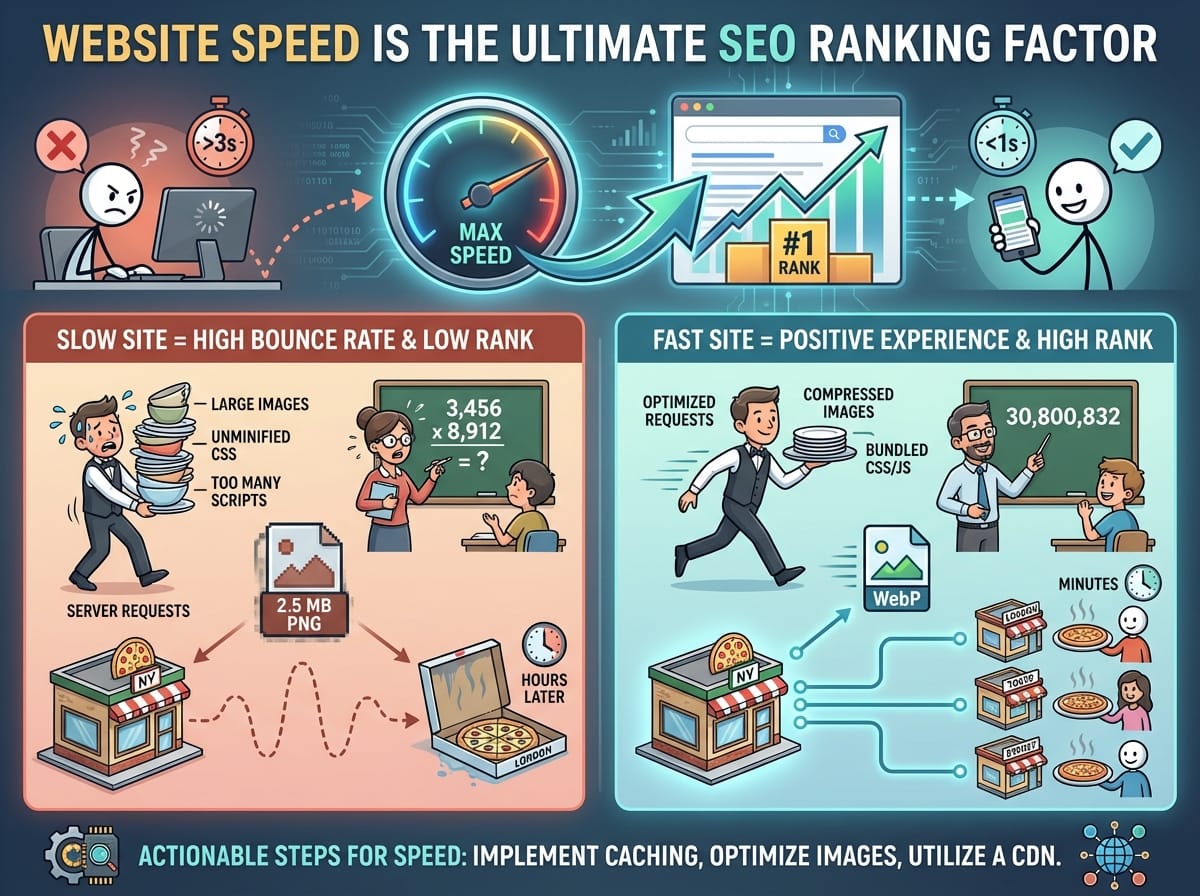
Why Website Speed is the Ultimate SEO Ranking Factor
If you want to rank higher on search engines, optimizing your website speed is no longer just a luxury—it is an absolute necessity. Search engines prioritize user experience above all else, and a fast-loading website is the foundation of a positive interaction. When search engine bots crawl your WordPress site, they measure how quickly your content becomes visible and interactive.
The Connection Between Load Times and Bounce Rate
When a visitor clicks your link in the search results, a timer starts. If your page takes longer than three seconds to load, statistics show that over half of your visitors will abandon the site. This abandonment metric is known as the bounce rate. High bounce rates signal to search engines that your website might not be providing a good user experience, which can actively push your rankings down.
Example: Imagine two competing websites, Site A and Site B, both selling custom mechanical keyboards. Site A loads in 1.2 seconds, while Site B takes 6 seconds. Even if Site B has superior products and better prices, Site A will consistently generate more sales and rank higher simply because frustrated shoppers leave Site B before the product images even render on the screen.
Understanding Server Requests and Website Weight
To successfully optimize your WordPress website, you first need to understand the underlying mechanics of what makes a website slow down in the first place.
What is a Server Request?
Every time someone visits your webpage, their internet browser has to send a message to your web host (the server) asking for the files that make up that specific page. These files include text data, high-resolution images, styling instructions (CSS), and interactive elements (JavaScript).
ELI5 (Explain Like I’m 5): Think of a server request like ordering food at a sit-down restaurant. You (the browser) ask the waiter (the server) for a burger, fries, a salad, and a drink. The waiter has to go all the way to the kitchen, gather every single item from different stations, and carry them back to your table. If you order 50 different items, it takes the waiter much longer to bring everything out. Similarly, if your webpage has 50 different images, fonts, and scripts, it takes the server much longer to deliver the webpage to the visitor’s screen.
Actionable Steps to Speed Up Your WordPress Site
Now that we understand the problem, here are the most effective SEO-driven strategies to reduce load times and improve your site’s performance.
Implement Page Caching
WordPress is a dynamic Content Management System (CMS). This means that every time a user visits a post, WordPress has to fetch information from the database and assemble the HTML page from scratch. This process takes time and server resources. Caching solves this by creating a static version of your page.
ELI5: Imagine you are a math teacher. A student asks you, “What is 3,456 multiplied by 8,912?” You have to grab a piece of paper, do the long multiplication, and calculate the answer (30,800,832). That takes a few minutes. If another student asks the exact same question 10 seconds later, you don’t do the math all over again. You just remember the final answer and tell them immediately. Caching is exactly that: your website doing the hard math once, remembering the final page, and instantly handing it to the next visitor.
Optimize and Compress Your Images
Images usually account for the majority of a website’s downloaded bytes. Uploading massive, uncompressed images directly from your phone or camera will severely throttle your page speed.
- Resize before uploading: Never upload a 4000-pixel wide image if your blog content area is only 800 pixels wide.
- Use Next-Gen formats: Convert your traditional JPEGs and PNGs into WebP format.
Example: A standard hero image saved as a high-quality PNG might be 2.5 Megabytes (MB) in size. By converting that exact same image to a WebP format and compressing it slightly, the file size drops to 150 Kilobytes (KB)—a 94% reduction in size with no visible loss in quality to the human eye.
Utilize a Content Delivery Network (CDN)
The physical distance between your website’s server and your visitor plays a massive role in loading times. Data travels fast, but it is still bound by the laws of physics. A Content Delivery Network (CDN) is a network of servers spread all over the globe that store copies of your website’s static files.
ELI5: Imagine you run a famous pizza shop located in New York. If someone in London orders your pizza, it will take hours to fly it over, and it will be cold by the time it arrives. To fix this, you open franchise kitchens in London, Tokyo, and Sydney, giving them your exact recipe. Now, when someone in London orders, the local London kitchen makes and delivers the pizza in 15 minutes. A CDN is exactly like those franchise kitchens; it stores copies of your website locally all around the world so visitors can download your site from a server right next door to them.